Making a stock pack
Your own trains in Traincraft: Reforged Locomotion, built and hosted here.
Start from the example
A small, complete pack: a diesel shunter in two liveries and a flat wagon. Download it, look at how it fits together, then replace the trains with your own.
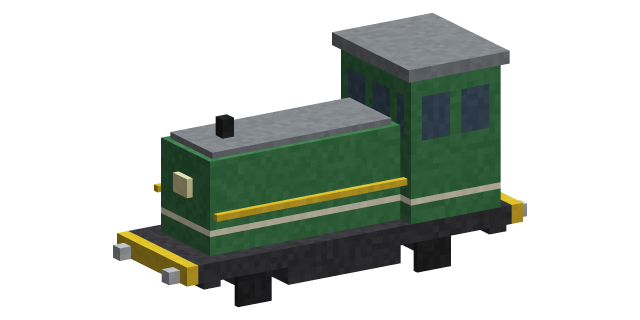
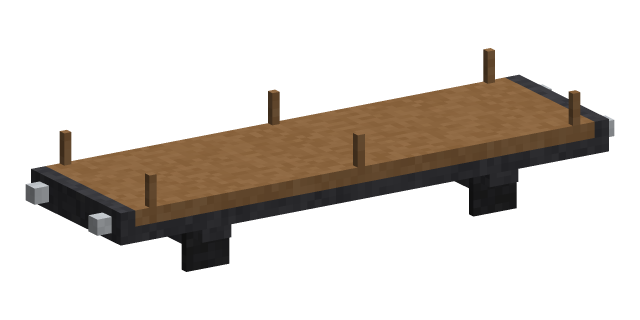
Follow the Traincraft content guidelines
Model your trains the way the Traincraft team recommends: Content Creation Guidelines. The parts that matter most here:
- Tools: FMT (recommended) or SMP Toolbox, plus any image editor with transparency (Paint.net, GIMP, Krita, Piskel).
- Exports this site reads: FMT "Default Flansmod" and SMP Toolbox "As Flan Java Model Large Model Fix". FMT's "FVTM V3 Java" is not supported yet.
- Sizes: rails are 12 pixels apart (wheels 11 to 12), and the player is drawn at 65 % (9 pixels wide, 21 tall): give seats room for that.
- Textures: 1 pixel of noise per microblock, colours between 30 and 225 (RGB), flat boxes textured on both sides.
Your pack, your rules: the guidelines are experienced advice. Packs that follow them and are checked by the site's admins can be featured, which lists them first here and in the game.
Exporting your model
Before you export
- Where the model sits. Build it centred on the origin along its length and width, with the wheels'
lowest point 10 pixels below the origin (in the exported file y points down: the example's wheels run from
y 4 to y 10). Then the render offset
0.2below puts it on the rail with no guessing. - Gauge. Wheels on the two sides 12 pixels apart, outer edge to outer edge (the example's wheel plates sit at z −7 and z 6, one pixel thick).
- Moving parts (wheels, rods) need their pivot at the point they turn around.
- Texture size. Set it in the model settings before you paint; it is written into the export as
textureX/textureYand must match the size of your texture files. In SMP Toolbox tick Allow HD Texture (Model → Model Settings) if you go above its default.
Export
- FMT: export as "Default Flansmod".
- SMP Toolbox: export as "As Flan Java Model Large Model Fix" (the other Java exports don't work).
- Name the file and the class in it alike, starting with
Model(ModelMyLoco.javaholdingclass ModelMyLoco), and put it inclient/render/models/. - Save the texture as a PNG, one per livery (see step 2 below).
The exported file
For this site you can upload the export as it comes out. The site reads the
bodyModel[...] = new ModelRendererTurbo(...) lines, addBox / addShapeBox,
setRotationPoint, translateAll and flipAll as text and never compiles your files,
so the Flan's Mod package and imports the exporters write don't matter. Compare with
ModelExampleShunter.java in the example.
If it looks wrong
- Floating or sunk into the track: change the middle number of the offset in
RenderEnum(new float[]{0F, 0.2F, 0F}): higher lifts it, in blocks. - Upside down or facing the wrong way: the rotation in
RenderEnumshould be{0F, 180F, 180F}for these exports;{0F, 0F, 180F}turns it round end to end. - Stretched, shifted or white texture: the texture file's size doesn't match
textureX/textureY, or its name doesn't match the texture prefix and livery. - Wheels beside the rails: check the 12-pixel gauge above.
- The pictures the site renders after each upload show these straight away: fix, upload a new version, look again.
What's in a pack
src/main/java/com/example/traincraftaddon/
  common/library/ExampleEnumTrains.java        the stock list
  common/library/ExampleItemIDs.java           spawner items and their icons
  common/library/ExampleEnumSounds.java        horn and engine sounds (optional)
  client/render/ExampleRenderEnum.java         which model and texture each train uses
  client/render/models/Model*.java             your exported models
  common/entity/rollingStock/ExampleEntity*.java   name, seat and coupling distance
src/main/resources/assets/exampletrains/
  textures/trains/ExampleShunter_Green.png     one texture per livery: <prefix><livery>.png
  textures/items/trains/example_shunter.png    16x16 inventory icon
Adding a train, step by step
- Model it and export it with one of the exports above into
client/render/models/. Use the texture size you modelled with; the export writes it at the top (textureX,textureY). - Paint a texture per livery and save each as
textures/trains/<prefix><livery>.png, for exampleExampleShunter_Green.pngandExampleShunter_Red.png. - Add it to the stock list (
EnumTrains). A locomotive:LOCO_SHUNTER("locoExampleShunter", "Example Shunter", ExampleEntityLocoShunter.class, ExampleItemIDs.minecartExampleShunter.item, "diesel", 450, 50, 1.2, // power (MHP), top speed (km/h), mass 10, 0, 40, // fuel use, water use, heating time 0.7, 0.9, 4000, // acceleration, brake, tank capacity new String[]{"Green", "Red"}, 18, -1.5, "Example pack"), // liveries, GUI scale, bogie position, tooltipAnything else (wagons, coaches, tenders):FREIGHT_FLAT_WAGON("freightExampleFlatWagon", "Example Flat Wagon", ExampleEntityFlatWagon.class, ExampleItemIDs.minecartExampleFlatWagon.item, "freight", 0.8, new String[]{"Brown"}, 18, 18, "Example pack"), // mass, liveries, GUI scale, cargo slots, tooltipTypes:diesel,electric,steam,hydrogenfor locomotives;freight,passenger,tender,tank,flatand so on for the rest. - Say how it's drawn (
RenderEnum):locoExampleShunter(ExampleEntityLocoShunter.class, new ModelExampleShunter(), "ExampleShunter_", true, new float[]{0F, 0.2F, 0F}, // offset in blocks: 0.2 puts wheels ending at y 10 on the rail new float[]{0F, 180F, 180F}, // turns an exported model the right way up null, "", 0, null, "", null, 0, false),Steam and diesel engines can add smoke: a type ("smoke"), a count and positions in place of"", 0, null. - Give it a spawner item (
ItemIDs):minecartExampleShunter("ItemRollingStock", "example_shunter", 3)and a 16x16 icontextures/items/trains/example_shunter.png. - Write its class (
common/entity/rollingStock/). The site reads three things from it: the name (getInventoryName), the distance to coupled stock (getOptimalDistance) and, for anything you can ride, the seat:TraincraftUtil.updateRider(this, -1.1, 0.2)(distance along the train in blocks, height). - Sounds (optional,
EnumSounds): Traincraft's own sounds by name, such as"chme3_horn", or your own inassets/<name>/sounds/with asounds.json.
Putting it on the site
- Sign up or log in, then create a pack. The namespace is your
pack's permanent id (lower case, e.g.
mytrains). Choose Open or Protected. - Zip your pack folder and, on the pack's page, choose Upload a version: what you upload is
source, enter a version (e.g.
1.0.0) and set Stock to include toall. - The site builds it and renders a picture of every train. Check the build log on the version page: skipped trains say why (no RenderEnum line, model not found, no texture), and no icon lists trains without an inventory icon.
- Fixed something? Upload again with a new version number. Servers on "Latest" get it at their next start.
Good to know
- Seats and roofs: riders are shrunk to 65 %; if a roof still reaches into the rider's head the game lowers the seat by itself.
- Animations: the guidelines' animation names (lamps, doors, liveries on parts, crates) aren't used by packs built here yet.
- Protected packs are encrypted and only go to servers you allow; you manage that on the pack's page.
- Questions or problems? Use the contact form.